Witty.ca - Graham's Professional Archives

  • Home
  • My Blog
  • Book Blog
    • Blog to Book
    • About
    • Contact
    • Links
      • Career Links in Fredericton
        • Job Hunting Tips
        • That's so 2010!
          • Old Home
            • Teaching Software>
              • Google Sketchup (free)
                • OpenOffice.org (free)
                  • Scratch (free)>
                    • Scratch (Scripts 1 & 2)
                      • Scratch (Script 3)
                        • Scratch (Frogger)
                          • Scratch (Frogger 2)
                            • Scratch (Frogger 3)
                              • Scratch (Frogger 4)
                                • Scratch (Rapids)
                                  • Notes for Teachers>
                                    • Teaching Scratch
                                      • Scratch Pop Quiz
                                        • Scratch Pop Quiz Marks
                                    • Middle School>
                                      • Literacy
                                        • Social Studies 6
                                          • Social Studies 7>
                                            • Online Test - Canada at Confederation
                                          • About>
                                            • About Mr. Rich
                                              • About Technology Education

                                            Building a Frogger-style 
                                                 video game in Scratch

                                            For those of you who've never used Scratch (a free programming tool from MIT), try my tutorials 1,2 & 3.

                                            Never heard of the Frogger video game?
                                            Try here (wikipedia) or here (Konami).
                                            (Or, just do a search for "Frogger".)

                                            Scratch Cat (from http://nagelelo.wikispaces.com)

                                            About these Tutorials

                                            A brief explanation of ownership and rights is found here:  Script 1&2.  If you use these tutorials, please let me know.

                                            About Scratch

                                            Scratch is an entry-level  free and open source software programming environment developed by MIT.

                                            Let's Make a Video Game!

                                            Picture
                                            In this unit of study, we'll be building our own Frogger-style video game.

                                            In this unit, we'll cover:
                                            • positive & negative numbers
                                            • X and Y coordinates
                                            • loops and conditions
                                            • variables and "broadcasts"
                                            • object-oriented programming
                                            • input devices (e.g. keyboard)
                                            • event sequences
                                            • ... and more


                                            What you will need:

                                            • Scratch installed on your computer.
                                            • Have completed some Scratch tutorials
                                              (Previous Scripts 1,2&3 will do.)
                                            • A sense of adventure!


                                            Getting the Frog Moving

                                            We are going to build our Frogger video game will only accept input from the arrow keys on the keyboard. 

                                            So, go ahead and change that cat into a frog.  
                                            But then what?

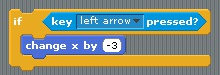
                                            We need to build a block that:
                                                if 
                                                    a key is pressed
                                                                                   then move the frog in only that direction.

                                            And so, that's exactly what we build.  
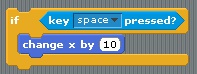
                                            Make it look like this.


                                            Picture
                                            Now, you have the building blocks,
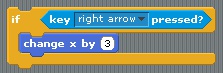
                                            so change the settings that:
                                                if 
                                                    the right arrow key is pressed
                                                                                   then move the frog 3 steps to the right.


                                            answer

                                            Common Problem

                                            Picture
                                            "I clicked the green flag and nothing happened!"

                                            Answer:  Did you press the arrow key on your keyboard?  Your script is waiting for that!


                                            The Right Arrow Key

                                            In Script 3e, we learned how to go down.  
                                            Use that knowledge to figure out how to also go left.

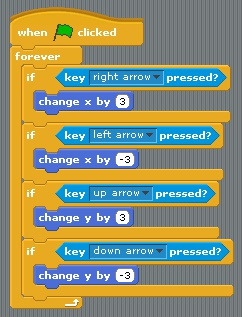
                                            Now, put it all together, so your script can sense and react to:
                                               up,   down,   left,   and   right.


                                            Test this out!     Does it work?


                                            answer


                                            answer

                                            Edit the Stage Background

                                            Next up, making a background!

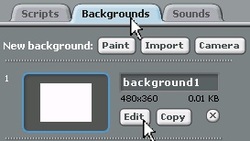
                                            Select the Stage object.

                                                  Select the Backgrounds tab.
                                             
                                                           Click the Edit button to modify the costume.


                                            Picture
                                            Background Construction Animated GIF

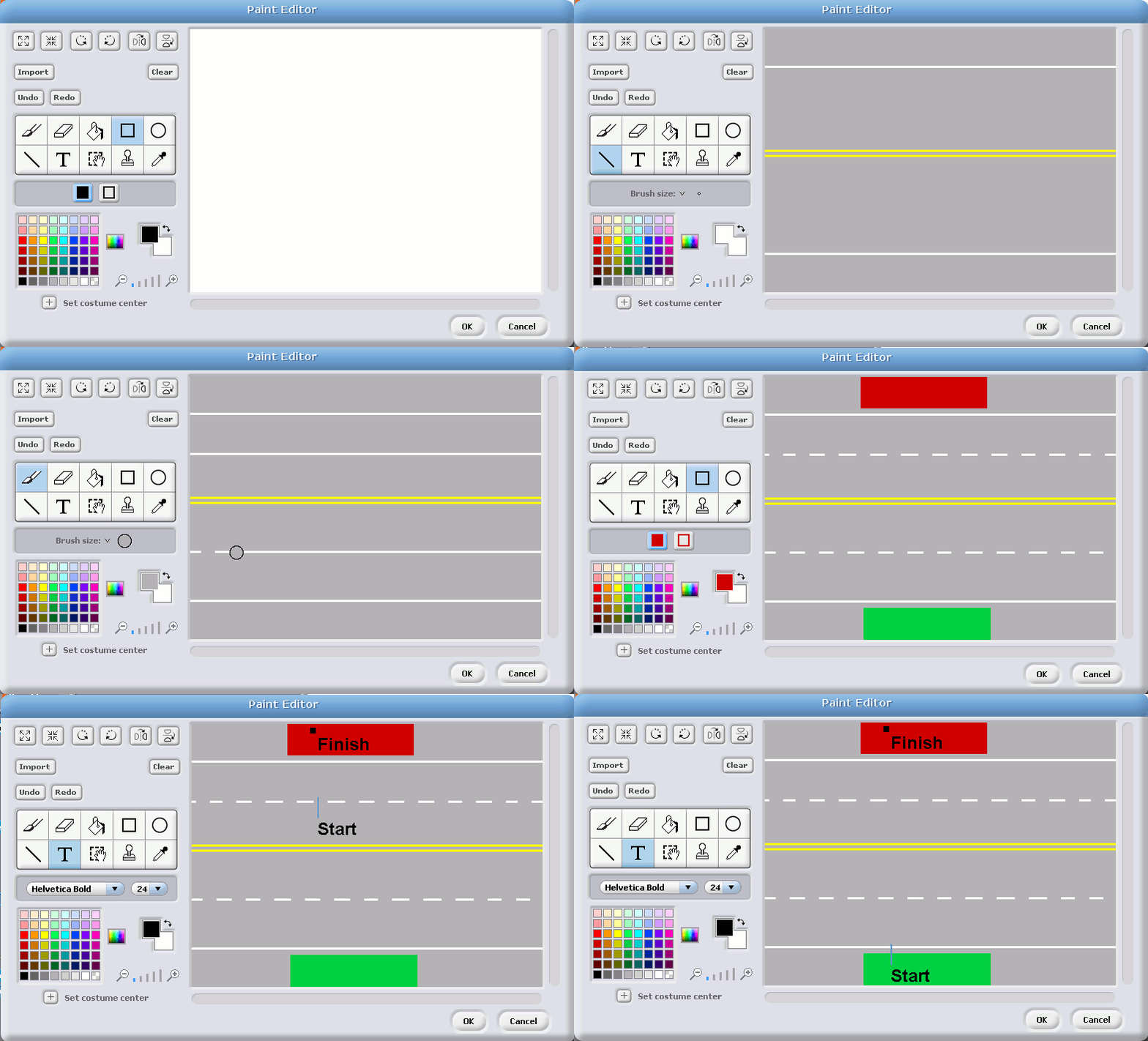
                                            Create the Highway

                                            There are two choices below. 
                                            They both show how to construct the highway image for the stage (background).

                                            What to do -- click image for animated GIF  -->

                                            How to do it  -- below on YouTube     .
                                            Picture
                                            Click this image for the full animation Instructions to make this highway are below in the YouTube video.


                                            on youtube

                                            Creating a moving car

                                            To make a car move, we use the same basic structure as when we wanted the cat to bounce around inside the fence.

                                            However, in this case, we have highway lanes that are perfectly horizontal.  So, to make sure that the cars stay in their lanes, instead of  "moving 10 steps", we're going to just "change x by 10".

                                            Trust me, this will keep everything nice and orderly!


                                            NEAT TRICK:
                                            Rather than making hundreds of cars, we're going to re-use our car so that (for now) only one car travels in each lane.

                                            To do this, we're going to make our car drive across the video game screen, and then "teleport" back to the beginning of the lane.

                                            Watch this video to get the idea.

                                            Common Problem

                                            Picture
                                            The second car takes some thinking.  
                                            Check out the video below.


                                            on youtube

                                            Duplicate the Second Car

                                            Object-oriented programming is great because everything is an object.  If you want another, just "duplicate" it.


                                            What did you say?

                                            You tried it, but it's all messed up?

                                            Ah ha!  The dreaded copy-and-paste error rears its ugly head!


                                            Watch this video to see where to make changes.


                                            on youtube

                                            Duplicate the Third Car

                                            Yes, you're completely right.  After showing us how to do the second car, there is absolutely no need to make a video showing how to create a third car.

                                            So go ahead.  It'll be easy....     ...right?

                                            Ummmm.  Teacher!  Why is my car smashing into the wall? ... over and over and over again?


                                            Well, that's not really "bashing".  No, it's more like a "jiggly dance", and the car is doing exactly what you've programmed it to do.

                                            Maybe you should watch this video to discover the simple solutions to fix your problem.


                                            on youtube

                                            Killing the Frog

                                            Sadly, in a video game called "Frogger", the whole point is to see how long the frog lasts before it dies.

                                            Thankfully, no actual real live frogs were harmed in the making of this game.


                                            But today, you get to learn how to kill those pesky virtual frogs.  You need to start by thinking like the blue car.   

                                            Once you can get into the mind of the blue car, everything else is easy.


                                            on youtube

                                            Frogger Lives Again!

                                            Now that you've killed the frog, it's time to bring the poor guy (or girl) back to life!

                                            So, here's a list of all the things that need to happen between the death and re-life of the frog.

                                            In ALL cars:

                                            • Dead frog message sent (variable)


                                            In the frogger:
                                            • Dead frog message received (variable)
                                            • Frog stops moving
                                            • Frog displays a message (looks = words)
                                            • Frog makes dying sound
                                            • Frog goes back to start (try glide!)
                                            • Frog comes back to life (variable)


                                            on youtube


                                            When you are completely done, the teacher will instruct you to click here.

                                            Copyright © Graham Rich 2010-2011.   Site made using Weebly.com.