Witty.ca - Graham's Professional Archives

  • Home
  • My Blog
  • Book Blog
    • Blog to Book
    • About
    • Contact
    • Links
      • Career Links in Fredericton
        • Job Hunting Tips
        • That's so 2010!
          • Old Home
            • Teaching Software>
              • Google Sketchup (free)
                • OpenOffice.org (free)
                  • Scratch (free)>
                    • Scratch (Scripts 1 & 2)
                      • Scratch (Script 3)
                        • Scratch (Frogger)
                          • Scratch (Frogger 2)
                            • Scratch (Frogger 3)
                              • Scratch (Frogger 4)
                                • Scratch (Rapids)
                                  • Notes for Teachers>
                                    • Teaching Scratch
                                      • Scratch Pop Quiz
                                        • Scratch Pop Quiz Marks
                                    • Middle School>
                                      • Literacy
                                        • Social Studies 6
                                          • Social Studies 7>
                                            • Online Test - Canada at Confederation
                                          • About>
                                            • About Mr. Rich
                                              • About Technology Education

                                            About these Tutorials

                                            The tutorials (called "Scripts 1, 2 & 3") are a teaching activity for my classes.  Until 2010, I taught these lessons at OREC, and now in Fredericton I decided to put these into an official web site with YouTube videos.

                                            I claim no ownership of Scratch.  All of the videos were made by me and you are free to use them in your classroom.  (Free to alter; free to mimic; free of cost.)

                                            If you like these tutorials and/or if you are using them in your classroom, please let me know.


                                            Scratch Cat (from http://nagelelo.wikispaces.com)

                                            About Scratch

                                            Scratch is a software tool that helps students learn software programming.   This is an entry-level tool (for students who have never programmed before).  It is free and open source software, and was developed by MIT.

                                            Let's Get To It!!!
                                                Tutorials Below!


                                            8 Palette Choices

                                            There are 8 main buttons that display a different palette of choices.  

                                            You'll flip back and forth between palettes to create your script (aka "program").


                                            (There is no script for this activity.)
                                            on youtube

                                            Basic Bounce
                                            (Script #1)

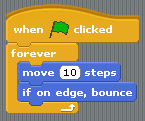
                                            Watch the video to create the script below.  

                                            Notice the "go to x, y" extra piece!


                                            Script #1

                                            Picture
                                            Drag-and-drop to make this script. 

                                            To start the script, click the green flag.

                                            To stop the script, click the red stop sign.


                                            on youtube

                                            Alter a Photo
                                            (Script #2)

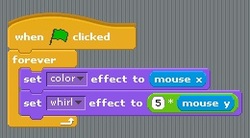
                                            Your script will sense the mouse's location and alter a photo.  (Hilarious!)
                                            • Watch the video
                                            • Create the script
                                            • Run the script
                                            • Can you add the multiply operator (see image below)


                                            Download

                                            Picture
                                              

                                            Script #2 (with an "Operator")

                                            Picture
                                             

                                            on youtube
                                            What is  " mouse x " ?
                                            What is  " mouse y " ?

                                            Are these  " x " and  " y "  the same directions as your math graphs?     
                                            In other words, if you move your mouse just up and down, what happens?    ... or just side-to-side?


                                            Copyright © Graham Rich 2010-2011.   Site made using Weebly.com.