Witty.ca - Mr. Rich's Professional Archives

  • Home
    • Lunch
    • Support
    • Intro
    • Cyber
    • Newest
    • Hour of Code
  • Courses
    • DMS 2023-2024 >
      • Tech and Design 6
      • Tech and Design 7
      • Tech and Design 8
    • -----------------------
    • DMS Archive 2022-2023 >
      • Tech and Design Grade 6 2022-2023
      • Tech and Design Grade 7 2022-2023
      • Tech and Design Grade 8 2022-2023
    • DMS Archive 2021-2022 >
      • Tech and Design Grade 6 2021-22
      • Tech and Design Grade 7 2021-22
      • Tech and Design Grade 8 2021-22
    • HCS Archive 2015-2016 >
      • HCS'15 Media Studies 120
      • HCS'15 Nutrition for Healthy Living 120
      • HCS'15 Visual Art 9
      • HCS'16 Intro to Electronics 110 >
        • Purchasing a Computer in 2016 >
          • HCS'15 Visual Art 110/120
      • HCS'16 Housing & Design 120
      • HCS'16 Visual Arts 10
      • HCS Winter Decoration Ideas
    • HCS Archive 2014-2015 >
      • HCS'15 - Digital Production 12
      • HCS'15 - Graphic Art & Design 11
      • HCS'15 - Media Studies 12
      • HCS'15 - Visual Art 10
      • HCS'14 - BBT 10
      • HCS'14 - Info Tech 11/12
      • HCS'14 - Visual Art 9
      • HCS'14 - Visual Art 11/12
      • HCS Art Club
      • HCS Announcement Text
    • HCS Archive 2013-2014 >
      • HCS'14 - English 12
      • HCS'14 - Graphic Design 11
      • HCS'14 - Individual & Family Dynamics 12
      • HCS'14 - Info Tech 12
      • HCS'14 - Social Studies 8
    • Student Introduction Form
  • Tech Units
    • Safety & Citizenship >
      • Work Place Safety
      • Digital Safety & Citizenship
      • Digital Communication
      • Digital Rights & Responsibilities
      • Digital Etiquette
      • Digital Wellness
      • Digital Business
      • Digital Access
      • Digital Literacy
      • Digital Law
    • Scratch Coding >
      • Scratch Explained
      • Scratch 3 - Crossy Road 1
      • Scratch 3 - Crossy Road 2
      • Scratch 3 - Teacher Notes
      • OLD - Scratch 2 (Coding) >
        • Scratch 2 - Introduction to Coding
        • Scratch 2 - How to
        • Scratch 2 - Introduction
        • Scratch 2 - Frogger (p1)
        • Scratch 2 - Frogger (p2)
        • Scratch 2 - Frogger (p3)
        • Scratch 2 - Frogger (p4)
        • Scratch 2 - Frogger (p5)
        • Scratch 2 (Coding) >
          • Scratch 2 - A 2nd Project
          • Scratch 2 - Teacher Notes
          • Scratch 2 - Choosing another language
      • OLD - Scratch 1 (Coding) >
        • Scratch 1 (Coding)
        • Scratch (Scripts 1 & 2)
        • Scratch (Script 3)
        • Scratch (Frogger)
        • Scratch (Frogger 2)
        • Scratch (Frogger 3)
        • Scratch (Frogger 4)
        • Scratch Mini-Challenge 1
        • Scratch Final Project
        • Notes for Teachers >
          • Teaching Scratch
    • Graphic Design with Inkscape >
      • Graphic Design Overview
      • Inkscape Act.1
      • Inkscape Act.2
      • Inkscape Act.3
      • Inkscape Act.4
      • Inkscape Act.5
      • Inkscape Act.6
      • Inkscape Bonus Challenge
    • Photoshop with The GIMP >
      • GIMP Overview
      • GIMP Install & Setup
      • GIMP Activity 0
      • GIMP Activity 1
      • GIMP Activity 3
      • GIMP Activity 4a
      • GIMP Activity 4b
      • GIMP Activity 6b
      • GIMP Activity 6e/f
      • GIMP Final Project - Cereal-Box
      • GIMP Final Project - Magazine Cover >
        • HCS'16 Graphic Art & Design 110
      • GIMP Bonus Assignment
      • GIMP Marking Breakdown
      • Raster Graphics Explained
      • Old GIMP Activities >
        • GIMP Activity 2
        • GIMP Activity 6a
        • GIMP Activity 6c
        • GIMP Activity 6d
    • Excel
    • Sewing
    • Audio / Video >
      • Videography
      • Sound (Audacity)
      • Video (One Minute PSA)
      • Make a Movie Trailer
      • Blender Video Editor - Test
    • Automotive >
      • Auto - Careers
      • Auto - Engines
      • Auto - 4-Stroke vs 2-Stroke
    • Coding - Teacher Start
    • Python (Coding) >
      • Python - CS 110 PD - July 2016
      • Python - CS 110 PD Part 2 (Projects)
      • Python - CS 110 PD Part 3 (GUI)
      • Install Python 3.5 + PyGame
    • Design (AutoCAD) >
      • Design Act. 1
      • Design Act. 2
      • Design Act. 3
      • Design Act. 4
      • Design Act. 5
      • Design Act. 5b and 5c
      • Design Act. 6
      • Design Act. 7
      • Design Act. 8
      • Design Act. 9
      • Design Act. 10
      • Design Act. 11
      • Design Act. 12
    • Design (Sketchup) >
      • Sketchup House Setup
    • Portable Apps >
      • Cam Studio
      • Virtual Dub
      • Scratch (and Zip File for Students)
      • TuxPaint (and Zip File for Students)
      • TuxTyping (and Zip File for Students)
      • Google Chrome
    • Project Management >
      • Intro to Project Mgmt.
      • Assignment for Project Management
    • Database >
      • Tasks Database
    • Final Projects and Exam Review >
      • Final Project - BBT 10 - 2015
      • Final Project - Digital Production 2015
      • Final Project - Media Studies 2015
      • Exam Review 2013
    • Cybersecurity
  • Art Units
    • Elements and Principles >
      • Elements of Art
      • Principles of Design
    • Photographic Composition
    • Visual Art 9
    • Graphic Art & Design 110 >
      • Colour Theory
      • Layout
      • Fonts and Type
    • Visual Art 110
    • Previous Box Projects - Visual Art 10
  • Other Units
    • Housing >
      • How to Design a House
    • Media Studies >
      • Media Studies Handouts
      • What is media? Why study media?
      • Film, Television and Video
      • Advertising, Marketing and You
      • Media and the Internet
      • Self-Study Project
    • Nutrition >
      • Recipes >
        • Black Bean Cake and Cupcake
  • Sports
    • Volleyball >
      • Volleyball Contact
      • (Old) NMS Volleyball 2019
      • (Old) Volleyball 2017
      • (Old) Volleyball Spring 2016
      • (Old) 2016 Tournament - MS Boys Volleyball
      • (Old) Volleyball Spring 2015
      • (Old) 2015 Tournament - MS Boys Volleyball
    • Soccer >
      • (Old) Soccer Fall 2015
    • Basketball
  • Blogs
    • Computer Science Blog
    • Personal Blog
  • Contact
  • About
    • About Mr. Rich
    • About Technology and Computer Science
  • Archives
    • Teaching Software >
      • Purchasing a Computer (notes) >
        • Purchasing a Computer
        • Computer Scenarios
        • Computer Presentation
        • PAC Test Instructions
        • PAC Peer Review
        • How to Submit Computer Comparisons
        • How to Submit Computer for Helen
      • Scratch 2 (Coding)
      • Scratch 1.4 (Programming)
      • ARCHIVED - GIMP (Raster Graphics)
      • ARCHIVED - Inkscape (Vector Graphics)
      • AutoCAD (2D Design)
      • Sketchup (3D Design) >
        • Google Sketchup (2011)
        • Google Sketchup (2012)
      • Excel vs Calc (Spreadsheet)
      • Cam Studio (Screen Capture Videos)
      • TuxPaint (for young kids)
      • TuxTyping (Typing Tutor)
    • Links >
      • Career Links in Fredericton
      • Job Hunting Tips
    • Presentations >
      • Scratch Workshop Oct 11, 2013
      • Scratch Workshop Sept 18, 2013
      • Math for French Immersion
    • Software That Is No More >
      • Setup (for an older version of Weebly) >
        • Setup - Day 1
        • How To Setup Your Weebly Pages
        • Marks (link to Canvas)
        • Web Portfolio
    • Previous Teaching >
      • Old Teacher's Logs >
        • Teacher's Log 2015-2016
        • Teacher's Log 2014-2015
        • Teaching Notes - Hartland 2014
        • BBT9 Teacher's Log (Apr-June2013)
        • BBT9 Teacher's Log (Jan - Apr 2013)
        • BBT9 2012
      • Sept2010-Jan2012 >
        • Old Home
        • Middle School >
          • Literacy
          • Social Studies 6
          • Social Studies 7 >
            • Online Test - Canada at Confederation
      • Jan2012-Nov2012 >
        • Book Blog >
          • Blog to Book
        • About Mr Rich
    • PD Sessions >
      • BBT9-10 Oct6 2016
      • BBT Teachers PD (Jan 2013)
      • Cyber-bullying (May 2013)
UPDATE:
The instructions below are for the older Scratch 2.
For the newer Scratch 3 instructions, click here.


Frogger, Page 2

In this page, we will:
  • Duplicate cars into the other lanes
  • Fix these duplicated cars so that they stay in their new lanes.

Picture
Scratch Cat (from http://nagelelo.wikispaces.com)
You must complete
Frogger, Page 1 
before starting here!

New to Scratch 2?

If you haven't used Scratch 2 before, check out:
  • Introduction to Coding
  • How to use Scratch 2
  • Introduction to Scratch 2 (with exercises)

Duplicate to Make the Second Car

Object-oriented programming is great because everything is an object.  If you want another, just "duplicate" it.

But beware!  If you copy-and-paste, then this duplicate will do EXACTLY what the first one did ... and we don't want that!

So, what will we fix to make it work right?

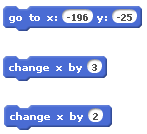
First, let's change where the car starts, so fix both 
GO TO X __ Y __
Set these to where the car starts.

Second, if this new car is in the passing lane, so you can make this one go faster, or make the first car go slower.
Again, here are the code blocks, and you can watch the video to see where they go.
Picture
Click for larger image

Duplicate to Make the Third Car

THIS IS THE HARD ONE!!!

Making a car go in the other direction should be easy... but it's not!

Is your car doing the "jiggly dance"?
Don't panic!  Help is here!

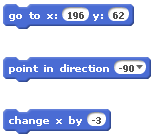
First, just like the car above, make changes to the 
GO TO X __ Y __

Second, you need your car to go in the other direction (because it's on the other side of the highway).  
How do you do this?

  1. At the beginning of the code, set the car to point in the right direction.
    "Motion" palette 
    -> POINT IN DIRECTION
  2. To make the cars go right, we used
    "CHANGE X BY 3".
    Now we want to go left. Any ideas?
Again, here are the code blocks, and you can watch the video to see where they go.
Picture
Click for larger image

Duplicate to make the Fourth Car

By now, you should not need this video. But if you do, here it is.


ADVANCED
ADVANCED
ADVANCED
ADVANCED
ADVANCED
ADVANCED
ADVANCED
ADVANCED
ADVANCED
ADVANCED
ADVANCED


CLONE Cars for More Per Lane

Advanced topic if you want a challenge!

CLONE is one of the new features in Scratch 2.  
CLONE is awesome!

(The CLONE feature is not necessary in this Frogger game, so don't worry if you skip this video.)


Next:  Frogger (Page 3)
Up:     Return to Scratch 2 (Coding)


Copyright © Graham Rich 2010-2023.   Site made using Weebly.com.